Protocol-Based Communication
External devices can interact with Mech-MSR through standard or custom industrial communication protocols.
Mech-MSR provides the following two communication modes so that you can choose the one that fits your scenario:
-
Standard Communication
Communication connections are established through standard or custom industrial communication protocols, and data is exchanged through the standard interface commands or Adapter interface provided by Mech-Mind. This mode is suitable for integration with most common industrial devices.
Standard communication includes Standard Interface Communication and Adapter Communication.
-
Standard Interface Communication refers to communication based on predefined protocols and data structures. You only need to configure parameters as required to exchange data with PLCs, robots, and other devices. No secondary development is required, and this mode offers strong compatibility and versatility.
-
Adapter Communication refers to a communication mode in which Mech-MSR is flexibly integrated with external devices such as PLCs, robots, and third-party systems through the adapter interface provided by Mech-Mind. Developers can build custom adapter programs based on the interface specifications and tools provided by Mech-Mind. Compared with Standard Interface Communication, Adapter Communication not only supports measurement data exchange but also supports extension and integration of business logic, providing greater flexibility and scalability.
-
Custom Communication
Custom Communication refers to a communication mode in which device connections are established through standard or custom industrial communication protocols and data is exchanged according to a format and parsing rules agreed upon by both sides. This mode is suitable for scenarios with special communication requirements and can flexibly meet various system integration needs.
How to Choose a Communication Mode
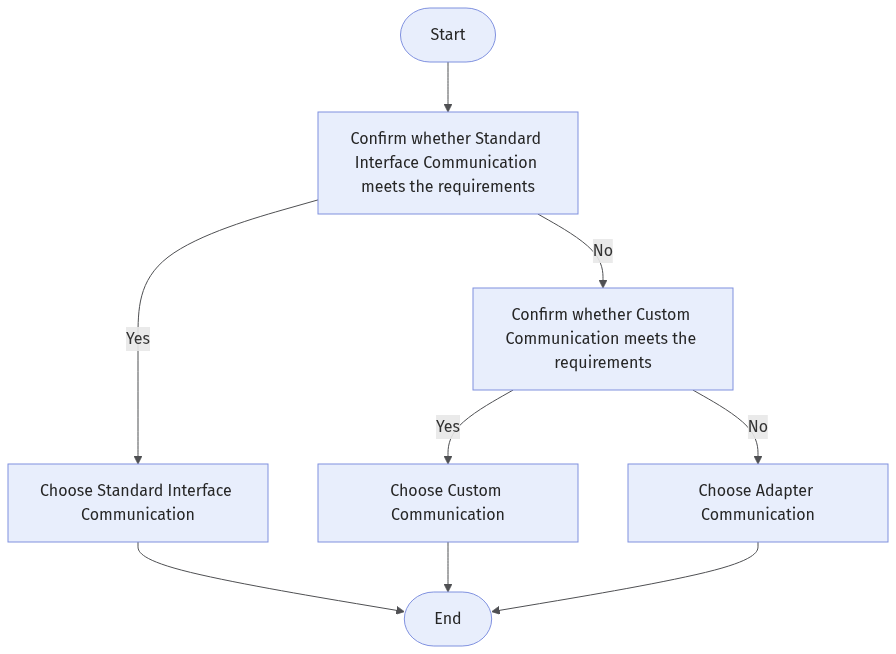
Choose a communication mode by following the process below:
-
Confirm whether Standard Interface Communication meets the project requirements.
-
If yes, choose Standard Interface Communication.
-
If no, proceed to the next step.
-
-
Confirm whether Custom Communication meets the project requirements.
-
If yes, choose Custom Communication.
-
If no, choose Adapter Communication.
-
Reading Guide
Read the following section to learn the workflow and configuration methods for Standard Interface Communication.
Read the following section to learn the workflow and configuration methods for Custom Communication.
Read the following section to learn the workflow and configuration methods for Adapter Communication.