Siemens S7 Client
Mech-MSR can communicate with external devices through Siemens S7 Client. Before you read the following content, make sure that the communication configuration has been completed in Mech-MSR.
About Siemens S7 Client
Siemens S7 series PLCs communicate with Mech-MSR through the TIA Portal software by using Siemens S7 Client. In this communication mode, Mech-MSR acts as the client and the PLC acts as the server.
Required Hardware and Software
Hardware
-
The following S7 series PLCs from Siemens are supported:
-
S7-300: Integrated PN network port or CP343-1
-
S7-400: Integrated PN network port or CP443-1
-
S7-1200: No special requirement for modules
-
S7-1500: No special requirement for modules
-
-
220V AC to 24V DC power adapter
-
The following industrial PCs are supported:
-
The standard IPC provided by Mech-Mind (recommended)
-
User-provided device
-
-
Network cable
Software
-
Siemens PLC programming software TIA Portal V15.1.
-
3D measurement and inspection software Mech-MSR (the latest version 2.2.0 is recommended).
-
Interface file
MM MSR Interface.dbfor Siemens PLC Snap7 communication between Siemens TIA Portal and Mech-MSR (used to enable data communication).
|
Communication Workflow
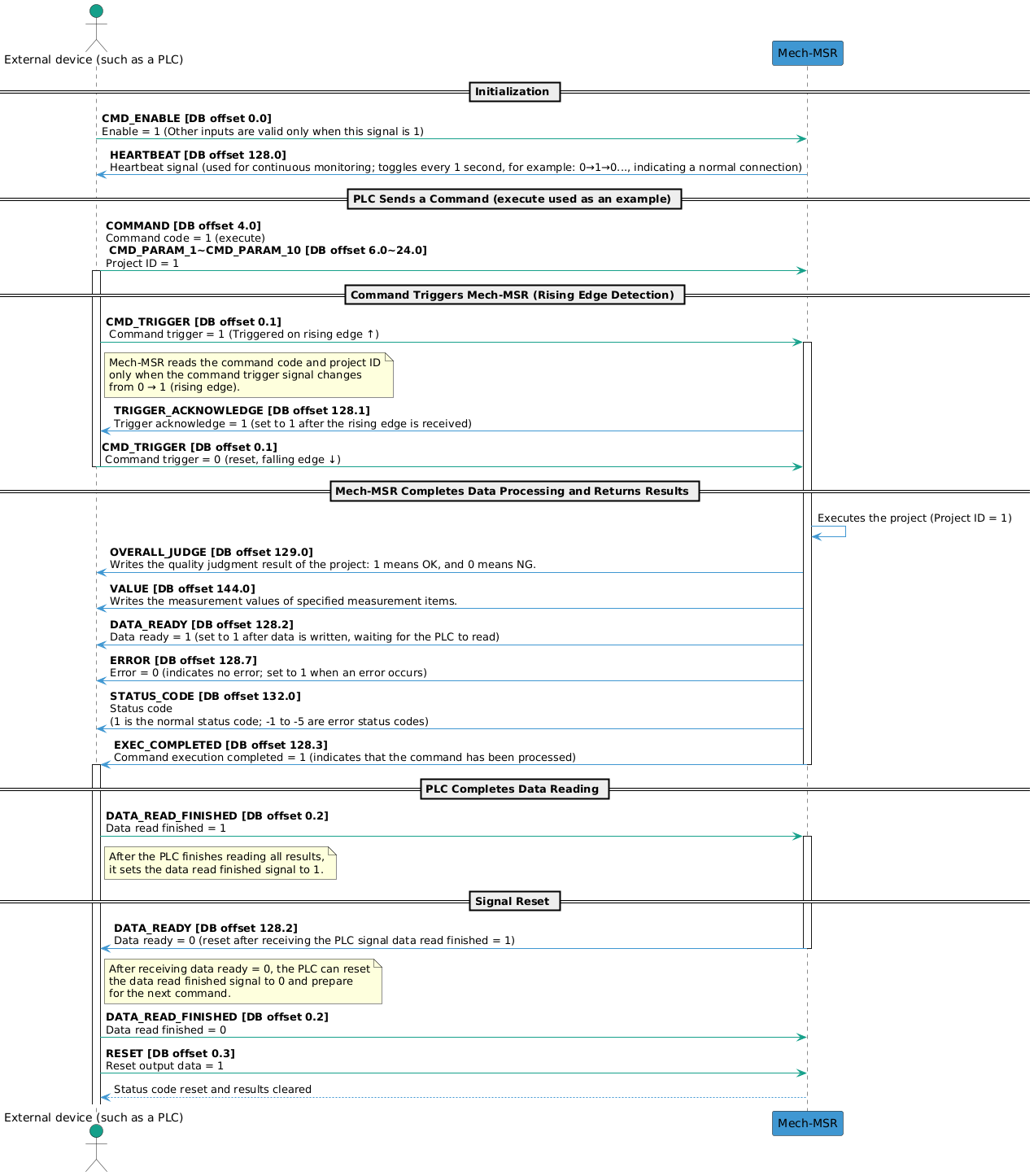
The workflow of Siemens S7 Client communication is shown in the figure below.
| See Input Signals and Output Signals to learn the meaning of each signal. |
Input Signals (from the PLC to Mech-MSR)
| Name | Description | Data type | DB offset |
|---|---|---|---|
Enable |
Boolean |
0.0 |
|
Command trigger |
Boolean |
0.1 |
|
Data read finished |
Boolean |
0.2 |
|
Reset output data |
Boolean |
0.3 |
|
BIT_SPARE_1 |
Reserved |
Boolean |
0.4 |
BIT_SPARE_2 |
Reserved |
Boolean |
0.5 |
BIT_SPARE_3 |
Reserved |
Boolean |
0.6 |
BIT_SPARE_4 |
Reserved |
Boolean |
0.7 |
BYTE_SPARE_1 |
Reserved |
Byte |
1.0 |
BYTE_SPARE_2 |
Reserved |
Byte |
2.0 |
BYTE_SPARE_3 |
Reserved |
Byte |
3.0 |
Command code |
Integer |
4.0 |
|
CMD_PARAM_1 |
Command parameter 1 |
Integer |
6.0 |
CMD_PARAM_2 |
Command parameter 2 |
Integer |
8.0 |
CMD_PARAM_3 |
Command parameter 3 |
Integer |
10.0 |
CMD_PARAM_4 |
Command parameter 4 |
Integer |
12.0 |
CMD_PARAM_5 |
Command parameter 5 |
Integer |
14.0 |
CMD_PARAM_6 |
Command parameter 6 |
Integer |
16.0 |
CMD_PARAM_7 |
Command parameter 7 |
Integer |
18.0 |
CMD_PARAM_8 |
Command parameter 8 |
Integer |
20.0 |
CMD_PARAM_9 |
Command parameter 9 |
Integer |
22.0 |
CMD_PARAM_10 |
Command parameter 10 |
Integer |
24.0 |
VAR_1 |
Variable 1 |
Float |
26.0 |
VAR_2 |
Variable 2 |
Float |
30.0 |
VAR_3 |
Variable 3 |
Float |
34.0 |
VAR_4 |
Variable 4 |
Float |
38.0 |
VAR_5 |
Variable 5 |
Float |
42.0 |
VAR_6 |
Variable 6 |
Float |
46.0 |
VAR_7 |
Variable 7 |
Float |
50.0 |
VAR_8 |
Variable 8 |
Float |
54.0 |
VAR_9 |
Variable 9 |
Float |
58.0 |
VAR_10 |
Variable 10 |
Float |
62.0 |
WORD_SPARE |
Reserved |
Word (0~30) |
66.0 |
CMD_TRIGGER
Mech-MSR reads the command code and command parameters only when the command trigger signal changes from 0 to 1 (rising edge). After Mech-MSR returns the Trigger Acknowledge signal, the command trigger signal can be set to 0.
DATA_READ_FINISHED
After the PLC finishes reading the data, set this signal to 1. Only after the Data Ready signal changes to 0 can this signal be set to 0.
RESET
When this signal is set to 1, the judgment results and measurement results received by the PLC (output) are cleared. At this point, the PLC can send a new command, and the related status codes are also reset.
COMMAND
The following table lists the supported commands in the current protocol and their corresponding command codes, command parameters, and descriptions.
| Command | Command Code | Command Parameter | Description |
|---|---|---|---|
execute |
1 |
Project ID. Only 1 project ID can be set at a time. |
Used to trigger a project to run and obtain the project’s judgment results and measurement results. |
trigger |
2 |
Project ID. 1 to 4 project IDs can be set at a time. |
Used to trigger a project to run. |
return |
3 |
Project ID. Only 1 project ID can be set at a time. |
Used to obtain the judgment results and measurement results of the specified project. |
judge |
4 |
Used to obtain the overall quality judgment result of the specified project or the judgment results of individual measurement items. |
|
value |
5 |
Mainly used to obtain the measurement values of the specified project. |
|
recipe |
6 |
Project ID and parameter recipe ID. |
Used to switch the parameter recipe used by a project. |
solution |
7 |
Solution ID. |
Used to switch a solution. |
SetNumVar |
8 |
Global variable ID. Only 1 can be set at a time. |
Used to set the value of a numeric global variable. The variable value is passed through VAR_INPUT. |
GetNumVar |
9 |
Global variable ID. Only 1 can be set at a time. |
Used to read the value of a numeric global variable. The result is returned through VALUE. |
TIP:
|
VAR_INPUT
When the SetNumVar command is executed, the set value is written to VAR_INPUT.
| Name | Description | Data Type | DB Offset |
|---|---|---|---|
VAR_1 |
Variable 1 |
Float |
26.0 |
VAR_2 |
Variable 2 |
Float |
30.0 |
VAR_3 |
Variable 3 |
Float |
34.0 |
VAR_4 |
Variable 4 |
Float |
38.0 |
VAR_5 |
Variable 5 |
Float |
42.0 |
VAR_6 |
Variable 6 |
Float |
46.0 |
VAR_7 |
Variable 7 |
Float |
50.0 |
VAR_8 |
Variable 8 |
Float |
54.0 |
VAR_9 |
Variable 9 |
Float |
58.0 |
VAR_10 |
Variable 10 |
Float |
62.0 |
Output Signals (from Mech-MSR to the PLC)
| Name | Description | Data type | DB offset |
|---|---|---|---|
Heartbeat signal |
Boolean |
128.0 |
|
Trigger acknowledge |
Boolean |
128.1 |
|
Data ready |
Boolean |
128.2 |
|
Command execution completed |
Boolean |
128.3 |
|
BIT_SPARE_1 |
Reserved |
Boolean |
128.4 |
BIT_SPARE_2 |
Reserved |
Boolean |
128.5 |
BIT_SPARE_3 |
Reserved |
Boolean |
128.6 |
Error |
Boolean |
128.7 |
|
Overall judgment result |
Boolean |
129.0 |
|
JUDGE_SPARE_1 |
Reserved |
Boolean |
129.1 |
JUDGE_SPARE_2 |
Reserved |
Boolean |
129.2 |
JUDGE_SPARE_3 |
Reserved |
Boolean |
129.3 |
JUDGE_SPARE_4 |
Reserved |
Boolean |
129.4 |
JUDGE_SPARE_5 |
Reserved |
Boolean |
129.5 |
JUDGE_SPARE_6 |
Reserved |
Boolean |
129.6 |
JUDGE_SPARE_7 |
Reserved |
Boolean |
129.7 |
BYTE_SPARE_1 |
Reserved |
Byte |
130.0 |
BYTE_SPARE_2 |
Reserved |
Byte |
131.0 |
Status code |
Integer |
132.0 |
|
BYTE_SPARE_3 |
Reserved |
Byte |
134.0 |
BYTE_SPARE_4 |
Reserved |
Byte |
135.0 |
Judgment results |
Boolean (0~63) |
136.0 |
|
Measurement results and variable values |
Float (0~63) |
144.0 |
HEARTBEAT
System heartbeat. It toggles every second. It can be used to determine whether the communication connection between the PLC and Mech-MSR is normal or disconnected.
TRIGGER_ACKNOWLEDGE
When Mech-MSR receives the rising edge of the Command Trigger signal, this signal is set to 1. When the command trigger signal falls, this signal is set to 0.
DATA_READY
Mech-MSR writes data to the output port and waits for the PLC to read it. When the Data Read Finished signal is 1, this signal is set to 0.
EXEC_COMPLETED
When command execution ends, this signal is set to 1, indicating that the command has been processed.
ERROR
When the status code returned by Mech-MSR is not 1, this signal is set to 1 to indicate an error.
OVERALL_JUDGE
The overall judgment result of the project. 1 indicates pass (OK), and 0 indicates fail (NG).
| Quality judgment rules must be configured for the project in the Output Management window of Mech-MSR, and the measurement items considered during quality judgment must be determined. Only after the configuration is complete can valid quality judgment results be obtained. |
STATUS_CODE
Mech-MSR may return the following status codes:
-
Normal status code: 1, indicating that the command was executed successfully.
-
Error status codes: -1, -2, -3, -4, and -5. See Error Codes for details.
JUDGE
The quality judgment results of measurement items added on the Communication Output tab in the Output Management window are returned here. 1 indicates pass (OK), and 0 indicates fail (NG).
| Up to 64 judgment results can be output at one time for a single project. |
VALUE
The VALUE module can return the following data:
-
The measurement results of the measurement items added on the Communication Output tab in the Output Management window.
-
The values of numeric global variables read when the
GetNumVarcommand is executed.
| Up to 64 measurement values can be output at one time for a single project. |