N-Point Localization
Description
This Step is used to calculate a list of robot poses for executing picking or placing actions in batches based on multiple sets of input feature data.
This Step supports both Eye-to-Hand and Eye-in-Hand camera mounting modes.
Workflow
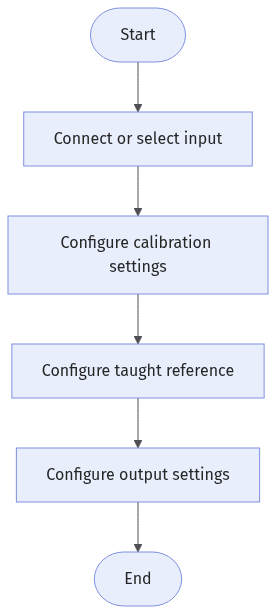
The process of configuring this Step is as follows:
-
Configure the input. Connect the corresponding Step ports in the graphical programming workspace, or select the corresponding input under Input in the parameter configuration panel.
-
Under Calibration Settings, select a translation calibration file, and add rotation calibration files and set compensation values as needed.
-
Under Taught Reference, acquire the base feature and set the related taught poses.
-
Under Output Settings, set the pose type.
-
Under Output, check the output items, and set the Lower Limit and Upper Limit for the output items as needed.
-
Run the Step and view output.
Input Description
| Input Item | Description |
|---|---|
Features |
List of positions and angles of the input features in the image coordinate system. |
Current Capture Poses |
List of corresponding real-time robot poses in the machine coordinate system when each feature is captured. This input is required only when the camera mounting mode is Eye-in-Hand, and is used to compensate for the effect of camera position changes on the output poses. |
Parameter Description
Calibration Settings
| Parameter | Description |
|---|---|
Translation Calibration File |
Select the translation calibration file used to calculate the position deviation. |
Rotation Calibration File |
Select the rotation calibration files used to calculate the angle deviations. Click Add calibration file to add calibration files. You can add up to 16 files. Calibration File 1 should be the rotation calibration file of the tool used to acquire the base feature during teaching. Add calibration files in the input order of features and current capture poses. After reordering, the calibration file placed first is used as the calibration file for teaching. |
Compensation Value |
Corrects the difference between the actual result and the expected result. You can set compensation values for positions in the X and Y directions and the rotation angle around the Z axis. |
Taught Reference
| Parameter | Description |
|---|---|
Base Feature |
Position and angle of the feature in the image coordinate system during teaching. X and Y indicate the position, and RZ indicates the rotation angle around the Z axis. Click Get base feature to open the Base Feature window. The following methods are available:
|
Taught Pick/Place Point X, Y, RZ |
X coordinate, Y coordinate, and rotation angle around the Z axis used when the robot executes the picking or placing action during teaching. |
Taught Capture Point X, Y, RZ |
X coordinate, Y coordinate, and rotation angle around the Z axis of the capture pose when the base feature is acquired during teaching. These parameters are required only when the camera mounting mode is Eye-in-Hand, and are used to compensate for the effect of camera position changes on the output poses. |
Output Description
| If you select an expandable output item (with ▶ on the left), you must expand it, and then set the Lower Limit and Upper Limit values to determine the acceptable range. If the output value falls within the acceptable range, the measurement item is judged as OK; otherwise, it is judged as NG. |
| Output Item | Description |
|---|---|
Localization Results |
List of poses for each tool to execute picking or placing actions for each feature. |
X |
List of X coordinates after localization in the machine coordinate system. |
Y |
List of Y coordinates after localization in the machine coordinate system. |
RZ |
List of rotation angles around the Z axis after localization in the machine coordinate system. |
Troubleshooting
|