Range XL-GL Projects Light Normally but Produces No Point Cloud or 2D Image
Symptom
When acquiring data from Range XL-GL with Mech-Eye Viewer, the camera projects light normally, but the software displays neither a point cloud nor a 2D image.
Possible Cause
The Windows system firewall is blocking communication between the software and Range XL-GL.
Solution
| This section applies only to Windows. If you use Ubuntu, contact Technical Support. |
Follow these steps to troubleshoot the issue:
-
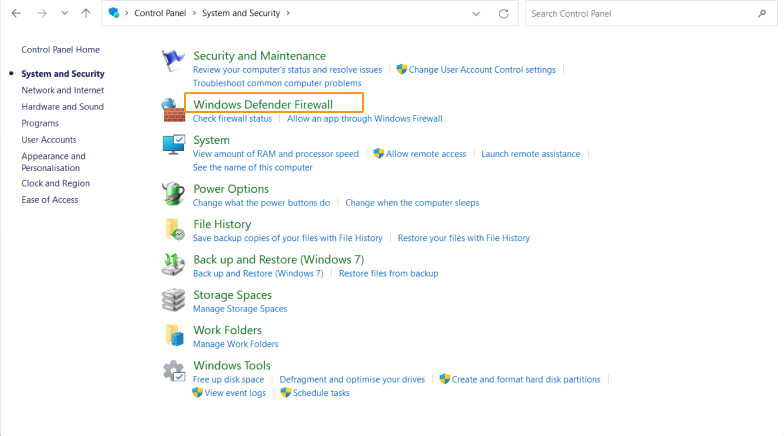
Open Control Panel and select .
-
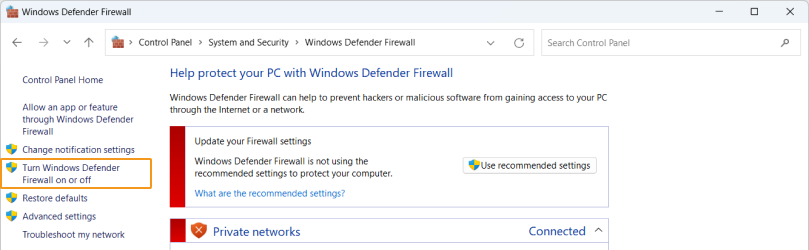
In the left pane, select Turn Windows Defender Firewall on or off, then check which option is selected.
-
If Turn on Windows Defender Firewall is selected, change it to Turn off Windows Defender Firewall. Then acquire data again in Mech-Eye Viewer and check whether the point cloud and 2D image are displayed.
-
If they are displayed, troubleshooting is complete.
-
If they are not displayed, contact Technical Support.
-
-
If Turn off Windows Defender Firewall is selected, contact Technical Support.
-