Siemens S7 Client Communication
Mech-MSR can communicate with external devices by using the Siemens S7 protocol where the software acts as the client. Before you read the following content, make sure that the communication configuration has been completed in Mech-MSR.
About Siemens S7 Client
Communication can be established between a Siemens SIMATIC S7 PLC and Mech-MSR based on the Siemens S7 protocol by using the TIA Portal software. Under this communication mode, Mech-MSR acts as the client and the PLC acts as the server.
Hardware and Software Requirements
Hardware
-
The following S7 series PLCs from Siemens are supported:
-
S7-300: Integrated PN network port or CP343-1
-
S7-400: Integrated PN network port or CP443-1
-
S7-1200: No special requirement for modules
-
S7-1500: No special requirement for modules
-
-
Power adapter: 220V AC to 24V DC
-
Supports the following industrial personal computer (IPC):
-
The standard IPC provided by Mech-Mind (recommended)
-
User-provided device
-
-
Ethernet cable
Software
-
Siemens PLC programming software TIA Portal V15.1
-
3D measurement and inspection software Mech-MSR (latest version 2.2.1 recommended)
-
Interface file for S7 communication between Siemens TIA Portal and Mech-MSR:
MM MSR Interface.db(for data communication)
|
Communication Workflow
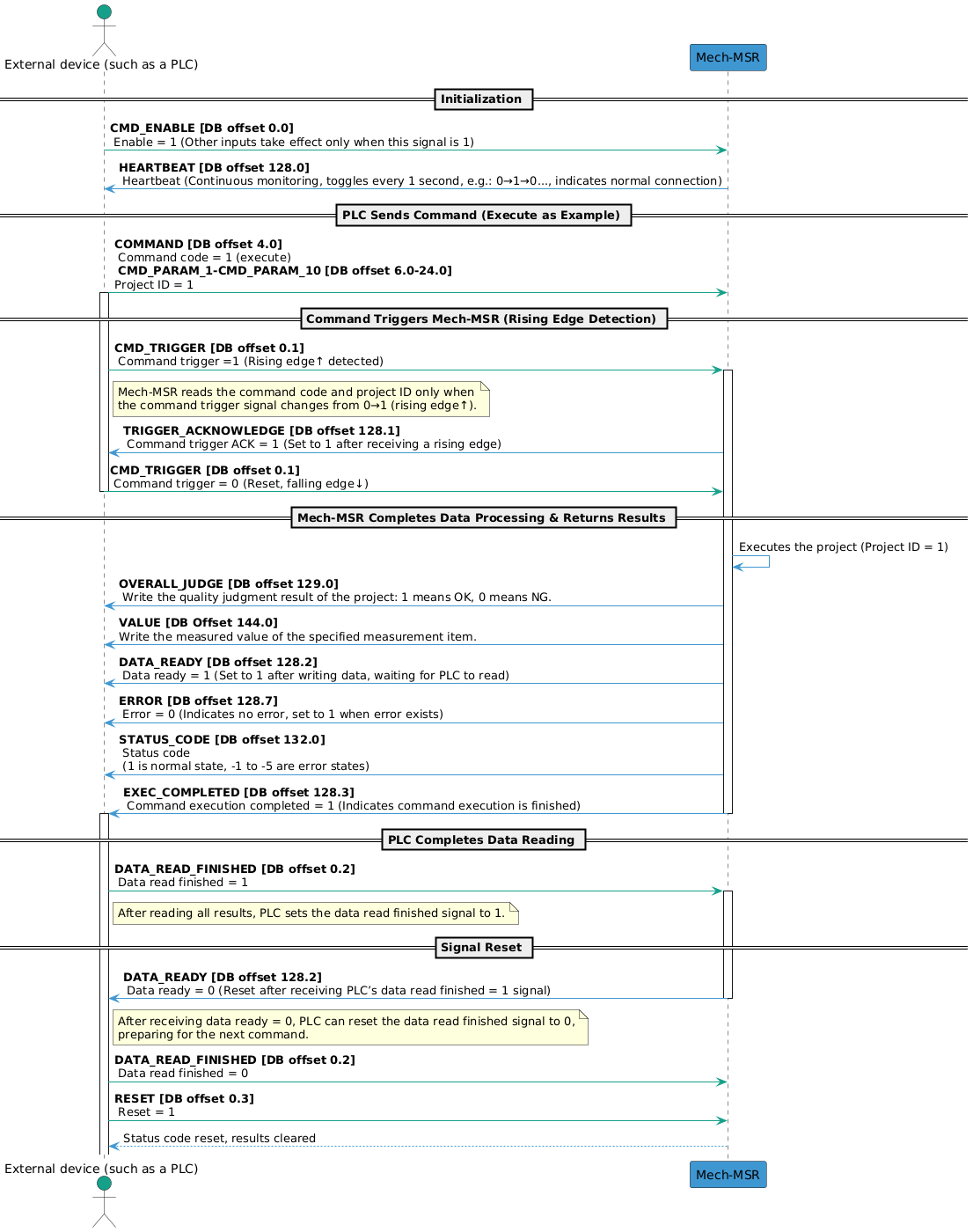
The workflow of Siemens S7 Client communication is shown in the figure below.
| See Input Signals and Output Signals to learn the meaning of each signal. |
Input Signals (from the PLC to Mech-MSR)
| Name | Description | Data type | DB offset |
|---|---|---|---|
Command enable |
Boolean |
0.0 |
|
Command trigger |
Boolean |
0.1 |
|
Data read finished |
Boolean |
0.2 |
|
Reset output data |
Boolean |
0.3 |
|
BIT_SPARE_1 |
A reserved field |
Boolean |
0.4 |
BIT_SPARE_2 |
A reserved field |
Boolean |
0.5 |
BIT_SPARE_3 |
A reserved field |
Boolean |
0.6 |
BIT_SPARE_4 |
A reserved field |
Boolean |
0.7 |
BYTE_SPARE_1 |
A reserved field |
Byte |
1.0 |
BYTE_SPARE_2 |
A reserved field |
Byte |
2.0 |
BYTE_SPARE_3 |
A reserved field |
Byte |
3.0 |
Command code |
Integer |
4.0 |
|
CMD_PARAM_1 |
Command parameter 1 |
Integer |
6.0 |
CMD_PARAM_2 |
Command parameter 2 |
Integer |
8.0 |
CMD_PARAM_3 |
Command parameter 3 |
Integer |
10.0 |
CMD_PARAM_4 |
Command parameter 4 |
Integer |
12.0 |
CMD_PARAM_5 |
Command parameter 5 |
Integer |
14.0 |
CMD_PARAM_6 |
Command parameter 6 |
Integer |
16.0 |
CMD_PARAM_7 |
Command parameter 7 |
Integer |
18.0 |
CMD_PARAM_8 |
Command parameter 8 |
Integer |
20.0 |
CMD_PARAM_9 |
Command parameter 9 |
Integer |
22.0 |
CMD_PARAM_10 |
Command parameter 10 |
Integer |
24.0 |
VAR_1 |
Variable 1 |
Float |
26.0 |
VAR_2 |
Variable 2 |
Float |
30.0 |
VAR_3 |
Variable 3 |
Float |
34.0 |
VAR_4 |
Variable 4 |
Float |
38.0 |
VAR_5 |
Variable 5 |
Float |
42.0 |
VAR_6 |
Variable 6 |
Float |
46.0 |
VAR_7 |
Variable 7 |
Float |
50.0 |
VAR_8 |
Variable 8 |
Float |
54.0 |
VAR_9 |
Variable 9 |
Float |
58.0 |
VAR_10 |
Variable 10 |
Float |
62.0 |
WORD_SPARE |
A reserved field |
Word (0–30) |
66.0 |
CMD_TRIGGER
When the command trigger signal changes from 0 to 1 (a rising edge is detected), Mech-MSR reads command codes and command parameters. When Mech-MSR returns the trigger acknowledge signal, the command trigger signal can be set to 0.
DATA_READ_FINISHED
When the PLC completes data reading, this signal can be set to 1. When the data ready signal changes to 0, this signal can be set to 0.
RESET
When this signal is set to 1, the PLC clears the received judgement result and measurement result. At this point, the PLC can send new commands and status code signals are reset.
COMMAND
The following table describes the commands supported by the Siemens S7 Client communication, the command codes, and the command parameters.
| Command | Command code | Command parameter | Description |
|---|---|---|---|
execute |
1 |
The project ID. Only one project ID can be set each time. |
Used to trigger the project and obtain project judgement result and measurement result. |
trigger |
2 |
Project ID. One to four project IDs can be set at a time. |
Used to trigger the project to run. |
return |
3 |
The project ID. Only one project ID can be set each time. |
Used to obtain the judgement result and the measurement result of the specified project. |
judge |
4 |
Used to obtain the overall quality judgment result of the specified project or the judgment results of individual measurement items. |
|
value |
5 |
Used to obtain the measured values of a specified project. |
|
recipe |
6 |
Project ID, parameter recipe ID |
Used to switch the parameter recipe used by the project. |
solution |
7 |
Solution ID. |
Used to switch the solution. |
SetNumVar |
8 |
ID of a global variable. Only one ID can be set at a time. |
Used to set values for global variables of numeric type. The value of the variable is passed through VAR_INPUT. |
GetNumVar |
9 |
ID of a global variable. Only one ID can be set at a time. |
Used to read the value of a global variable of numeric type. The result is returned by VALUE. |
|
VAR_INPUT
When SetNumVar is executed, the set value is set to VAR_INPUT.
| Name | Description | Data type | DB offset |
|---|---|---|---|
VAR_1 |
Variable 1 |
Float |
26.0 |
VAR_2 |
Variable 2 |
Float |
30.0 |
VAR_3 |
Variable 3 |
Float |
34.0 |
VAR_4 |
Variable 4 |
Float |
38.0 |
VAR_5 |
Variable 5 |
Float |
42.0 |
VAR_6 |
Variable 6 |
Float |
46.0 |
VAR_7 |
Variable 7 |
Float |
50.0 |
VAR_8 |
Variable 8 |
Float |
54.0 |
VAR_9 |
Variable 9 |
Float |
58.0 |
VAR_10 |
Variable 10 |
Float |
62.0 |
Output Signals (from the PLC to Mech-MSR)
| Name | Description | Data type | DB offset |
|---|---|---|---|
Heartbeat signal |
Boolean |
128.0 |
|
Trigger acknowledge |
Boolean |
128.1 |
|
Data ready |
Boolean |
128.2 |
|
Execution completed |
Boolean |
128.3 |
|
BIT_SPARE_1 |
A reserved field |
Boolean |
128.4 |
BIT_SPARE_2 |
A reserved field |
Boolean |
128.5 |
BIT_SPARE_3 |
A reserved field |
Boolean |
128.6 |
Error |
Boolean |
128.7 |
|
Overall judge |
Boolean |
129.0 |
|
JUDGE_SPARE_1 |
A reserved field |
Boolean |
129.1 |
JUDGE_SPARE_2 |
A reserved field |
Boolean |
129.2 |
JUDGE_SPARE_3 |
A reserved field |
Boolean |
129.3 |
JUDGE_SPARE_4 |
A reserved field |
Boolean |
129.4 |
JUDGE_SPARE_5 |
A reserved field |
Boolean |
129.5 |
JUDGE_SPARE_6 |
A reserved field |
Boolean |
129.6 |
JUDGE_SPARE_7 |
A reserved field |
Boolean |
129.7 |
BYTE_SPARE_1 |
A reserved field |
Byte |
130.0 |
BYTE_SPARE_2 |
A reserved field |
Byte |
131.0 |
Status code |
Integer |
132.0 |
|
BYTE_SPARE_3 |
A reserved field |
Byte |
134.0 |
BYTE_SPARE_4 |
A reserved field |
Byte |
135.0 |
Judgment result |
Boolean (0-63) |
136.0 |
|
Measurement results and variable values |
Float (0–63) |
144.0 |
HEARTBEAT
System heartbeat. It toggles every second. Used to determine whether the PLC and Mech-MSR are connected or disconnected.
TRIGGER_ACKNOWLEDGE
When Mech-MSR receives the rising edge for the command trigger signal, this signal is set to 1. When a falling edge is detected for the command trigger signal, this signal is set to 0.
DATA_READY
Mech-MSR writes data to output ports and waits for the PLC to read the output data. When the data read signal is set to 1, this signal is set to 0.
EXEC_COMPLETED
When the command execution completes, this signal is set to 1, which indicates that the command execution is completed.
ERROR
If the status code returned by Mech-MSR is not 1, an error occurred and this signal is set to 1.
OVERALL_JUDGE
The overall judgement of the project. 1 indicates OK, and 0 indicates NG.
| You need to set quality judgment rules for the project in the Output Management window in Mech-MSRand determine the measurement items to be considered. Only after the configuration is complete can valid judgment results be obtained. |
STATUS_CODE
The possible returned status codes for Mech-MSR are as follows:
-
Normal status code: 1, indicating that the command was executed successfully.
-
Error codes: -1, -2, -3, -4, -5. For more information, see Error Codes.
JUDGE
Judgement results were added for measurement items on the Communication output tab in the Output Management window. 1 indicates OK, and 0 indicates NG.
| At most 64 judgement results can be output for a single project at a time. |
VALUE
The VALUE module returns the following data:
-
Measurement results are added for measurement items on the Communication output tab in the Output Management window.
-
The values of numeric global variables are read when the
GetNumVarcommand is executed.
| At most 64 measurement results can be output for a single project at a time. |