Robot Thermal Drift Compensation Tool
The Robot Thermal Drift Compensation Tool is used to assign robots to projects and enable thermal drift compensation, to compensate for robot accuracy errors caused by thermal drift. The thermal drift compensation file is generated by the Robot Thermal Drift Compensation Step.
This tool is applicable to high-precision inline measurement scenarios.
Function Entry
Select from the menu bar to open the tool window.
| Using this tool requires a Mech-Metrics license. If the license is missing, the tool window can be opened, but the configuration cannot be edited. |
Usage Instructions
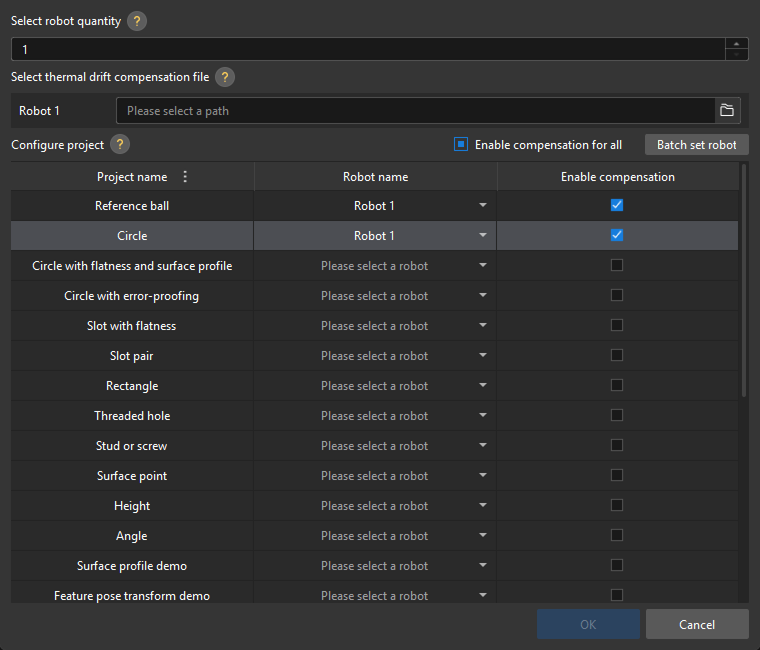
-
Under Select robot quantity, set the number of robots. A maximum of 8 robots can be configured.
-
When you reduce the number of robots, the removed robots are automatically disassociated from their current projects, and you need to manually reassign robots to these projects.
-
When you increase the number of robots, the newly added robots are in an unconfigured state, and you need to manually assign them to projects.
-
-
In the Select thermal drift compensation file area, select the corresponding thermal drift compensation file for each robot.
-
In the Configure project area, assign robots to projects and enable compensation as needed.
Parameter Description Project name
The name of a project in the current solution.
Robot name
Select the target robot from the drop-down list to specify the robot used by the project.
Enable compensation
When selected, robot thermal drift compensation will be enabled for the project.
Enable compensation for all
When selected, robot thermal drift compensation is enabled for all projects; when cleared, robot thermal drift compensation is disabled for all projects.
Batch set robot
Hold Ctrl or Shift to select multiple project entries, and then click this button to set robots for the selected projects in batch.
-
Click OK to save the configuration and close the window.
| If you click Cancel or close the window directly, unsaved configurations will be cleared. |
Precautions
-
If the thermal drift compensation file path of a robot changes, update the file path of the robot in this tool.
-
If a prompt indicates that the robot corresponding to a project cannot be found when the project runs, check the robot configuration of the project in this tool.