Set Up Communication Between External Device and Mech-MSR via TCP ASCII
About TCP ASCII
TCP ASCII is a communication mode based on TCP connections and ASCII string commands. It can be used for interaction between external devices such as PLCs and Mech-MSR. In this communication mode, the external device acts as the TCP client and Mech-MSR acts as the TCP server. After the connection is established, the external device can trigger a project to run and obtain data such as judgment results and measurement results by sending string commands.
This communication mode is simple to configure and easy to debug. It is suitable for scenarios in which string commands are used to control project execution or read results. Before you read the following content, make sure that the communication configuration has been completed in Mech-MSR.
Communication Workflow
Depending on the on-site control method, TCP ASCII communication can follow either of the following workflows:
-
If the external device needs to actively send commands to trigger project execution and obtain results as needed, see Communication Workflow (Command-Based).
-
If Mech-MSR needs to automatically push results to the client after project execution, see Communication Workflow (Command-Free).
Communication Workflow (Command-Based)
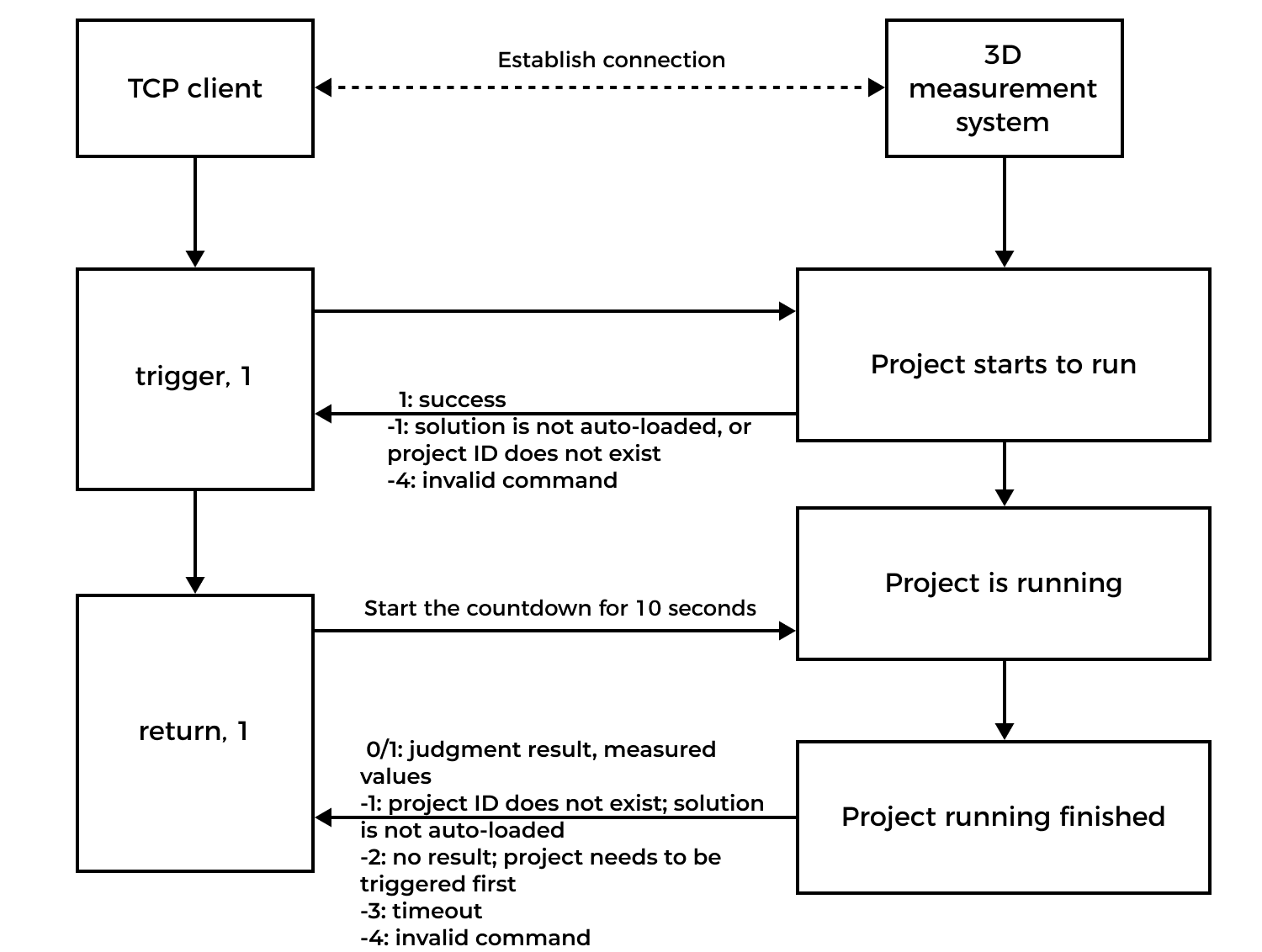
The workflow of TCP ASCII communication based on commands is shown in the figure below.
|
The communication workflow is as follows:
-
A TCP client (such as a PLC) establishes a TCP connection with the 3D measurement system (Mech-MSR).
-
The TCP client sends a
triggercommand to trigger the project to run. -
Mech-MSR returns the status code for the command. For example, if the project is triggered successfully, Mech-MSR returns
1. -
The TCP client sends a
returncommand to obtain the measurement results. After Mech-MSR receives the command, it starts the countdown for 10 seconds. -
Mech-MSR returns results. For example, if the project is run successfully, Mech-MSR returns the measurement results. If the project has not finished running within 10 seconds, Mech-MSR returns the error code
-3.
Communication Workflow (Command-Free)
The TCP ASCII communication mode enables the 3D measurement system (Mech-MSR) to automatically push results to the client (such as a PLC) after each project run, without requiring a request from the client. It is recommended for use when the laser profiler(s) are in the continuous acquisition mode or when project execution is triggered by I/O signals.
The communication workflow is as follows:
-
Select the Auto-push results option when configuring TCP ASCII communication.
-
Set Data Format of Return Commands. Mech-MSR will automatically push the results in the specified data format.
-
(Optional) Configure the project execution condition. For example, you can set the execution mode to Run upon Image Update in the project toolbar.
-
A TCP client establishes a communication connection with the 3D measurement system.
-
After each project run, Mech-MSR automatically pushes the results to the client.
The next section on TCP ASCII Commands will show the commands supported and analyze the returned results.